How to take screenshot on Samsung Galaxy S4
First method. Using key combination.
- Find a screen you wish to capture.
- Then press and hold these buttons together; Home + Power. See the image for example.
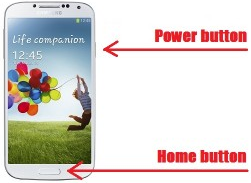
- And keep pressing till you hear the capturing sound and confirmation windows. You can see your captured screen in your Gallery folder.

To use this feature you need to firstly enable it on Samsung settings. Once it's enabled all you need just swipe your palm to from left to right or otherwise on any screen you wish to capture.
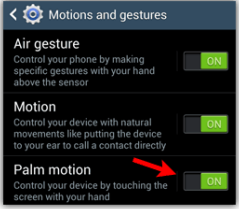
To activate the palm motion on Samsung Galaxy S4.
- Launch Settings app on your Galaxy S4.
- Then open My Device tab.
- Now scroll down to Motions and Gestures then tap it.
- And set the Palm motion to On.


 How To Take Screenshot
Write down your comments here
.Want your questions or opinions to be read...?
Please use the comment area below!