Asus ZenFone offers so many easiness for users, this can be seen through features, facilities and technology brought by the not-too-expensive smart Android phone. One of the features is taking a screenshot on your ZenFone, this activity is a most searched by the users of the phone. That's because they don't know the methods are actually so easy.
And for whatever reasons you might have to take a screenshot, certainly you will need one of these two easiest ways for screen capturing in Asus Zenfone. If you are interested, please to follow every steps below.
How to capture screen on Asus ZenFone 4, 5 and 6
First method
The first method is a bit complicate compared with the second one, but in regard of sharing information I also include it for you to know.

- Find a screen you like to capture, then press and hold these two physical buttons; Volume Down (-) dan Power.
- Keep pressing the buttons for about 2 seconds, or until you hear the capturing sound. You will know if the screen is captured. Because it's too obvious.
- Done, now your screenshot is ready and saved in the Gallery folder of your Android phone.
- Go to Application - Settings - ASUS Customized Settings.
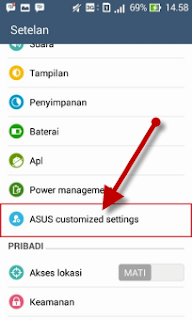
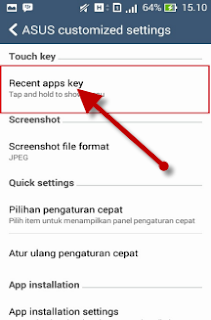
- Now in the Recent Apps Key options, just select the Tap and hold to get screenshot.
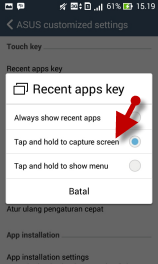
- And find a screen you wish to capture.
- When you find one, then press the Recent Apps button, till you hear the capturing sound.

- Done! Your new captured screen is ready in your Gallery app. Easy wasn't? Repeat the process from step 3 to 4 each time you want to take a screenshot.


 How To Take Screenshot
June 15, 2017 at 2:20 AM
Wow! many people don't know about the another method. which is unique and easy to take screenshot.
#Mobile App Development
#Android App Development
#IOS App Development
Write down your comments here
.Want your questions or opinions to be read...?
Please use the comment area below!